Most programs use data in one form or another, whether it is as input, output, or both. The sources of input and output can vary between a local file, a socket on the network, a database, variables in memory, or another program. Even the type of data can vary between objects, characters, multimedia, and others.
The Java Development KitTM (JDKTM) provides APIs for reading and writing streams of data. These APIs have been part of the core JDK since version 1.0, but are often overshadowed by the more well-known APIs, such as JavaBeansTM, JFC, RMI, JDBCTM, and so on. However, input and output streams are the backbone of the JDK APIs, and understanding them is not only crucial, but can also make programming with them a lot of fun.
This article covers the fundamentals of Java
streams by reviewing the differences between byte and character streams,
peruses the various stream classes available in the java.io
package, and looks at the concept of stream chaining.
Overview
To bring data into a program, a Java program
opens a stream to a data source, such as a file or remote socket, and reads
the information serially. On the flip side, a program can open a stream
to a data source and write to it in a serial fashion. Whether you are reading
from a file or from a socket, the concept of serially reading from, and
writing to different data sources is the same. For that very reason, once
you understand the top level classes (java.io.Reader, java.io.Writer),
the remaining classes are straightforward to work with.
Character Streams versus Byte Streams
Prior to JDK 1.1, the input and output classes
(mostly found in the java.io package) only supported 8-bit
byte streams. The concept of 16-bit Unicode character
streams was introduced in JDK 1.1. While byte streams were supported via
the java.io.InputStream and java.io.OutputStream
classes and their subclasses, character streams are implemented by the java.io.Reader
and java.io.Writer classes and their subclasses.
Most of the functionality available for byte
streams is also provided for character streams. The methods for character
streams generally accept parameters of data type char parameters,
while byte streams, you guessed it, work with byte data
types. The names of the methods in both sets of classes are almost identical
except for the suffix, that is, character-stream classes end with the suffix
Reader or Writer and byte-stream classes end with
the suffix InputStream and OutputStream. For example,
to read files using character streams, you would use the java.io.FileReader
class; for reading it using byte streams you would use java.io.FileInputStream.
Unless you are working with binary data, such as image and sound files, you should use readers and writers (character streams) to read and write information for the following reasons:
- They can handle any character in the Unicode character set (while the byte streams are limited to ISO-Latin-1 8-bit bytes).
- They are easier to internationalize because they are not dependent upon a specific character encoding.
- They use buffering techniques internally and are therefore potentially much more efficient than byte streams.
Bridging the Gap Between Byte and Character Streams
To bridge the gap between the byte and character
stream classes, JDK 1.1 and JDK 1.2 provide the java.io.InputStreamReader
and java.io.OutputStreamWriter classes. The only purpose of
these classes is to convert byte data into character-based data according
to a specified (or the platform default) encoding. For example, the static
data member "in" in the "System" class is essentially
a handle to the Standard Input (stdin) device. If you want
to wrap this inside the java.io.BufferedReader class
that works with character-streams, you use InputStreamReader
class as follows:
     BufferedReader in = new BufferedReader(new
    InputStreamReader(System.in));
For JDK 1.0 Versions
If you are developing with an older version of the JDK (prior to JDK 1.1), perhaps because you are developing applets for older browsers, simply use the byte-stream versions that work just as well. Note, byte versions work almost identically to the character versions from a developer's perspective except that the reader/writers accept character data types versus byte data types.
Various Stream Classes
As you might have guessed, thejava.io
package contains the Java I/O stream classes. These classes are either the
top level abstract classes or the specialized descendant
implementation classes, both types are described below.
Top Level Classes: java.io.Reader
and java.io.Writer
Reader and Writer
are the abstract parent classes for character-stream based classes in the
java.io package. As discussed above, Reader classes
are used to read 16-bit character streams and Writer classes
are used to write to 16-bit character streams. The methods for reading and
writing to streams found in these and their descendent classes (discussed
in the next section) are:
int read()int read(char cbuf[])int read(char cbuf[], int offset, int length)int write(int c)int write(char cbuf[])int write(char cbuf[], int offset, int length)
Consider the following simple example program
that demonstrates how the read and write methods can be used (this program
is similar to the MS-DOS type and Unix cat commands,
that is, it displays the contents of a file):
import java.io.*;


   // Displays contents of a file
   //(e.g. java Type app.ini)
   public class Type
     {
     public static void main(
       String args[]) throws Exception
     {
      // Open input/output and setup variables
      FileReader fr = new FileReader(args[0]);
      PrintWriter pw = new PrintWriter(
        System.out, true);
      char c[] = new char[4096];
      int read = 0;

      // Read (and print) till end of file
      while ((read = fr.read(c)) != -1)
         pw.write(c, 0, read);

      // Close shop
      fr.close();
      pw.close();
     }
   }
The following code fragment from the above program, opens the input and output streams:
   FileReader  fr = new FileReader(args[0]);
   PrintWriter pw = new PrintWriter(System.out, true);
The program reads the input file and displays its contents until it reaches an end-of-file condition (-1), as shown here:
    while ((read = fr.read(c)) != -1)
     pw.write(c, 0, read);
Notice the "(char cbuf[])" version of the read method. This is used here because in most cases reading a single character at a time can be approximately five times slower than reading chunks of data (array) at a time.
Other Notable Methods
Some other notable methods in the top-level
classes include skip(int), mark(int), reset(),
available(), ready() and flush(),
these are described below.
skip() as the name implies, allows
you to skip over characters.
mark() and reset()
provide a book-marking feature that allows you to read ahead in a stream
to inspect the upcoming data but not necessarily process it. Not all streams
support "marking." To determine if a stream supports marking, use the markSupported()
method.
InputStream.available() tells you
how many bytes are available to be read before the next read()
will block. Reader.ready() is similar to the available()
method, except it does not indicate how many characters are available.
The flush() method simply writes
out any buffered characters (or bytes) to the destination (for example,
file, or socket).
Specialized Descendent Stream Classes
There are several specialized stream classes
that subclass from the Reader and Writer classes to provide additional functionality.
For example, the BufferedReader not only provides buffered
reading for efficiency but also provides methods such as "readLine()" to
read a line of input.
The following class hierarchy shows a few of
the specialized classes found in the java.io package: Reader
- BufferedReader
- LineNumberReader
- FilterReader
- PushbackReader
- InputStreamReader
- FileReader
- StringReader
The above hierarchy simply demonstrates how
stream classes extend their parent classes (for example, LineNumberReader)
to add more specialized functionality.
The following three tables provide a more comprehensive
list of the various descendent classes found in the java.io
and other packages, along with a brief description for each class. These
descendent classes are divided into two categories: those that read from,
or write to data sinks, and those that perform some sort of processing
on the data—this distinction is merely to group the classes into two logical
sections, you do not have to know one way or the other when using them.
Note: to give you a general idea of the various
types of descendant classes provided in the JDK, these tables only show
a subset of the classes found in the java.io package. The byte
counterparts to the char-based classes and a few others have been
intentionally skipped. Please refer to the Java
Platform 1.2 API Specification (java.io) for a complete list.
| Table 1. Data Sink Streams | |
|---|---|
| CharArrayReader and CharArrayWriter | For reading from or writing to character buffers in memory |
| FileReader and FileWriter | For reading from or writing to files |
| PipedReader and PipedWriter | Used to forward the output of one thread as the input to another thread |
| StringReader and StringWriter | For reading from or writing to strings in memory |
| Table 2. Processing Streams | |
|---|---|
| BufferedReader and BufferedWriter | For buffered reading/writing to reduce disk/network access for more efficiency |
| InputStreamReader and OutputStreamWriter | Provide a bridge between byte and character streams. |
| SequenceInputStream | Concatenates multiple input streams. |
| ObjectInputStream and ObjectOutputStream | Use for object serialization. |
| DataInputStream and DataOutputStream | For reading/writing Java native data types. |
| LineNumberReader | For reading while keep tracking of the line number. |
| PushbackReader | Allows to "peek" ahead in a stream by one character. |
|
Table 3. Miscellaneous Streams (java.util.zip package) |
|
|---|---|
| CheckedInputStream and CheckedOutputStream | For reading/writing and maintaining a checksum for verifying the integrity of the data. |
| GZIPInputStream and GZIPOutputStream | For reading/writing data using GZIP compression/decompression scheme. |
| ZipInputStream and ZipOutputStream | For reading/writing ZIP archive files. |
Stream Chaining
One of the most convenient features of the I/O stream classes is that they are designed to work together via stream chaining.
Stream chaining is a way of connecting several stream classes together to get the data in the form required. Each class performs a specific task on the data and forwards it to the next class in the chain. Stream chaining can be very handy. For example, Divya Incorporated's 100% Pure Java backup software, BackOnline, chains several stream classes to compress, encrypt, transmit, receive, and finally store the data in a remote file.
The following figure portrays chaining three
classes to convert raw data into compressed and encrypted data that is stored
in a local file. This is how it works: the data is written to GZIPOutputStream,
which compresses the input data and sends it to CryptOutputStream.
CryptOutputStream encrypts the data prior to forwarding it
to FileOutputStream, which writes it out to a file. The result
is a file that contains encrypted and compressed data.
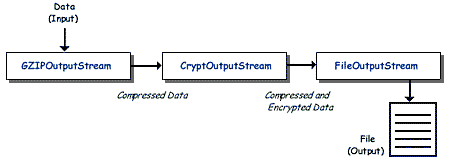
The source code for the stream chaining shown in the above figure would look something like this:
  FileOutputStream  fos =
    new FileOutputStream("myfile.out");
   CryptOutputStream cos = new CryptOutputStream(fos);
   GZIPOutputStream  gos = new GZIPOutputStream(cos);
or simply:
    GZIPOutputStream gos = new
    GZIPOutputStream(new CryptOutputStream(new
    FileOutputStream("myfile.out")));
To write to chained streams, you simply call
the write() method on the outermost class as follows:
gos.write('a');
Similarly, when closing chained streams, you
only need to close the outermost stream class because the close()
call is automatically trickled through all the chained classes; in the example
above, you would simply call the close() method on the GZIPOutputStream
class.
Summary
This article reviewed JDK I/O streams, which
should give you a good understanding of how to program with them. Remember,
there are many I/O stream classes in the java.io package, so
if you plan to use streams in your programs, it would be worth your while
perusing the JDK
1.2 API documentation about the java.io package. You might also find
the Java Tutorial
helpful.

Anil Hemrajani is a senior consultant at Divya Incorporated, a consulting firm specializing in Java/Internet software solutions. Anil Hemrajani provides Java/Internet-based architecture, design and development solutions to Fortune 500 companies, and occasionally writes articles and speaks at conferences. He can be reached at anil@divya.com